Page 1 of 2
no output at all in GAMLj3
Posted: Wed Oct 08, 2025 10:34 am
by Arnaud Mortier
Hi,
I have been trying to run GAMLj3 version 3.6.2 in jamovi version 2.6.44.0 and no output is displayed no matter what I do. Sorry if this has been posted before, I did search and was surprised to find nothing.
I also noted that when I slide a variable from one side to another, the variable then stays as a ghost under the cursor ; I had seen that happening before sometimes, but there it really keeps happening all the time.
Thanks for any help!
Arnaud
Re: no output at all in GAMLj3
Posted: Sun Oct 12, 2025 11:45 am
by Arnaud Mortier
Hi again, adding some information here:
The OS is Windows 11, and I was able to replicate the problem on several machines. I haven't tried other OS.
The problem occurs in all models of GAMLj3: the General, Mixed, and Generalized models as well.
Not only there is no output, but the variable selection process looks broken, it allows me to include the same factor or covariate several times in the same model (whereas usually once a variable is added to a model it no longer appears as available in the list on the left).
A variable selected as a DV does disappear from the list of available variables, but when you set another DV it doesn't come back, see below.
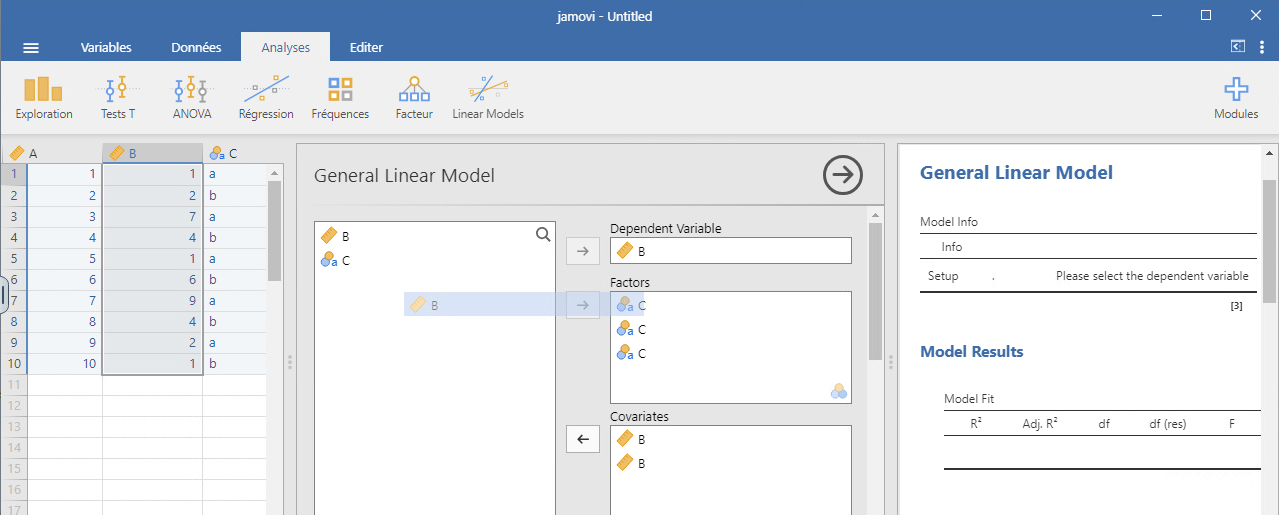
- Screenshot from 2025-10-12 13-44-30.png (81.75 KiB) Viewed 97857 times
Thanks for any help.
Arnaud
Re: no output at all in GAMLj3
Posted: Mon Oct 13, 2025 5:16 am
by jonathon
hi arnaud,
apologies for the delay in getting back to you.
some changes were made in the 3.6.2 which break compatiblity with jamovi 2.6 ... i've just rolled the version of GAMLj available in the library back to 3.6.1 which should restore functionality.
sorry for the inconvenience
jonathon
Re: no output at all in GAMLj3
Posted: Mon Oct 13, 2025 8:08 am
by Arnaud Mortier
Hi Jonathon,
Thank you so much for the solution found. The best part is that I won't have anything to ask from my IT systems department - they really don't like making mid-term updates - so that's awesome!
Best wishes,
Arnaud
Re: no output at all in GAMLj3
Posted: Mon Mar 23, 2026 5:38 pm
by Arnaud Mortier
Hi,
I have a similar problem to the above, this time with GAMLJ3 version 3.6.5, and jamovi version 2.6.44.0. The module crashes most of the time when I enter the Model tab and try to select several model terms at once (from the column on the right) using the shift key, then removing them from the model. Sometimes the crash occurs upon selecting the variables, sometimes it occurs upon clicking the arrow button on the left to remove them from the model, and in all cases I'm left with a shadow of my variables following the mouse.
Sometimes it doesn't happen at once, but it eventually does if I repeat the process of including and removing the variables to/from the model.
Best regards,
Arnaud
Re: no output at all in GAMLj3
Posted: Tue Mar 24, 2026 8:58 am
by mcfanda@gmail.com
Are you using GAMLj3 3.6.5 on jamovi 2.6.44? On 2.6.44 GAMLj3 3.6.1 should work fine
Re: no output at all in GAMLj3
Posted: Tue Mar 24, 2026 9:19 am
by mcfanda@gmail.com
Due to structural changes, jamovi version 2.6.* supports GAMLj3 up to version 3.6.1. Newer versions of GAMLj3 are available for jamovi 2.7.*. We update the 2.6 library to offer GAMLj3 3.6.1. Thus, please remove GAMLj3 3..6.1 from your installation and install version 3.6.1
Re: no output at all in GAMLj3
Posted: Tue Mar 24, 2026 1:46 pm
by Arnaud Mortier
Hi,
I can see that the available GAMLJ3 version is now 3.6.1, but I'm still facing the same issue.
I'm sorry, I understand that it would be easier to simply update jamovi to 2.7.*, but our IT department won't make mid-term updates.
Thanks for your help.
Best regards,
Arnaud
Re: no output at all in GAMLj3
Posted: Wed Mar 25, 2026 12:51 pm
by Arnaud Mortier
PS: for the record, here is a screenshot after the module breaks.
Thanks for any help.
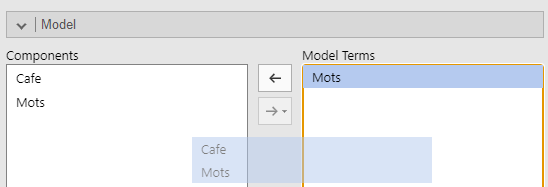
- image.png (8.13 KiB) Viewed 67473 times
Re: no output at all in GAMLj3
Posted: Wed Mar 25, 2026 10:20 pm
by jonathon
are there particular steps you can outline, that causes this to happen? we're having difficulty reproducing the issue.
jonathon