Page 1 of 1
Calculating mean based on different number of cells containing values
Posted: Fri Feb 06, 2026 10:48 am
by DorotheaJulia
Hello
I need to calculate the mean of 6 best out of 8 where rows have different numbers of missing values. I tried to do an IF ELSE formula by counting existing values out of 8 and subtracting one if there are one or two missing values, otherwise not. However it comes out as misspecified all the time. Here is the formula I tried to use. Would appreciate if someone spots the glitch.
IF(COUNT(v1,v2,v3,v4,v5,v6,v7,v8)>=7),(SUM(v1,v2,v3,v4,v5,v6,v7,v8)-MIN(v1,v2,v3,v4,v5,v6,v7,v8))/6, SUM(v1,v2,v3,v4,v5,v6,v7,v8)/6
Re: Calculating mean based on different number of cells containing values
Posted: Fri Feb 06, 2026 10:30 pm
by jonathon
i think you're just missing a bracket on the end?
IF(COUNT(v1,v2,v3,v4,v5,v6,v7,v8)>=7,(SUM(v1,v2,v3,v4,v5,v6,v7,v8)-MIN(v1,v2,v3,v4,v5,v6,v7,v8))/6, SUM(v1,v2,v3,v4,v5,v6,v7,v8)/6)
not sure if the rest of the logic of your formula is correct, but this gets us passed the mis-specified error.
reading your description, i'm not 100% sure what you're trying to do. i gather the following won't do?
MEAN(v1,v2,v3,v4,v5,v6,v7,v8, ignore_missing=1, min_valid=6)
jonathon
Re: Calculating mean based on different number of cells containing values
Posted: Sat Feb 07, 2026 1:35 pm
by DorotheaJulia
Thank you so much for a fast answer Jonathan! That really solves it, that is for the instances where I have a minimum of 6 cells with values. The only thing is that sometimes there are less than 6 and those get left out with the min_valid=6
I am calculating a grade based on 8 assignments but grading for the best 6 out of those. Some students, unfortunately, only turned in 4 or 5 or even less so I am trying to figure out a way to 'take out' the lowest two grades for everyone, after which I divide by 6 because if I use MEAN it means that those who only turned in two out of 8 getting a grade of say 7 for each, would end up with 7....not very fair:)
I need some sort of IF ELSE that is, if 7 or 8 grades exist, subtract the two lowest before dividing with six or calculating mean; else just sum everything and divide with 6 Have not been able to work this out:(
Re: Calculating mean based on different number of cells containing values
Posted: Sat Feb 07, 2026 1:43 pm
by DorotheaJulia
jonathon wrote: Fri Feb 06, 2026 10:30 pm
i think you're just missing a bracket on the end?
IF(COUNT(v1,v2,v3,v4,v5,v6,v7,v8)>=7,(SUM(v1,v2,v3,v4,v5,v6,v7,v8)-MIN(v1,v2,v3,v4,v5,v6,v7,v8))/6, SUM(v1,v2,v3,v4,v5,v6,v7,v8)/6)
not sure if the rest of the logic of your formula is correct, but this gets us passed the mis-specified error.
reading your description, i'm not 100% sure what you're trying to do. i gather the following won't do?
MEAN(v1,v2,v3,v4,v5,v6,v7,v8, ignore_missing=1, min_valid=6)
jonathon
Was wondering if I could incorporate both conditions into the same formula, something like:
MEAN(v1,v2,v3,v4,v5,v6,v7,v8, ignore_missing=1, min_valid=6), IF(COUNT(v1,v2,v3,v4,v5,v6,v7,v8)<=5,(SUM(v1,v2,v3,v4,v5,v6,v7,v8)/6
but it does not seem to work
Re: Calculating mean based on different number of cells containing values
Posted: Sun Feb 08, 2026 3:34 am
by jonathon
hmm, i don't think there's a straightforward way to do this in jamovi ... i think we need to implement some sort of SORT() function
your best bet might be to use the Rj Editor+ as follows:
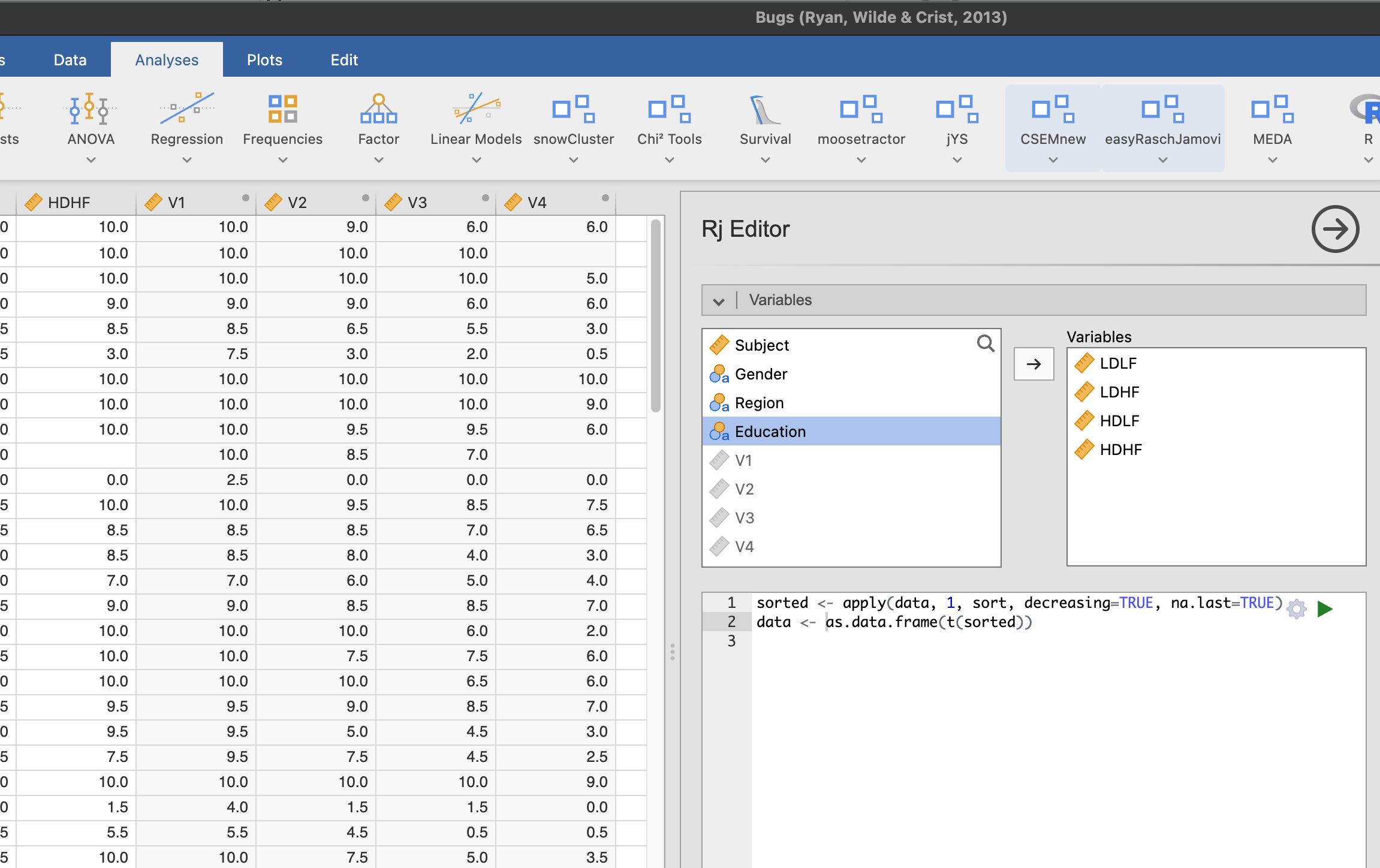
sorted <- apply(data, 1, sort, decreasing=TRUE, na.last=TRUE)
data <- as.data.frame(t(sorted))
you'll see this sorts the columns provided, and adds new columns to your data set, placing the highest value in V1, second highest in V2, etc. etc.
to calculate the mean for each participant, you would create another computed variables with the formula:
MEAN(V1, V2, V3, V4, V5, V6, ignore_missing=1)
- Screenshot 2026-02-08 at 14.29.31.png (375.02 KiB) Viewed 174086 times
Re: Calculating mean based on different number of cells containing values
Posted: Sun Feb 08, 2026 2:27 pm
by MAgojam
Hey @DorotheaJulia!
Beyond the syntax error you encountered (the misplaced parenthesis), your logic of manually subtracting one or two values is difficult to maintain because it doesn't scale automatically when rows have different numbers of missing values.
The Logic Error:By subtracting only one value when you have 8, you are left with 7 values, but still dividing by 6. This creates an inconsistent mean. To get a true "Best 6," you must always ensure the denominator is 6 and that
all surplus lower values are excluded
The Optimized Approach:The most robust way to handle this in jamovi is using the
Rj Editor + module. Instead of complex IF/ELSE strings, a simple R script allows for a "Dynamic Slicing" logic:
- Automatic Ranking: The script sorts each row from highest to lowest.
Dynamic Scart: It automatically drops the lowest 1, 2, or $X$ values depending on how many are present, always keeping exactly the N best scores.
Centralized Control: You only need to modify one parameter (BestN <- 6) to change the target for the entire dataset.
User-Friendly: It works dynamically with whichever columns you select in the jamovi variables panel, so you don't need to hard-code variable names.
Use the script provided below to process your data.
Code: Select all
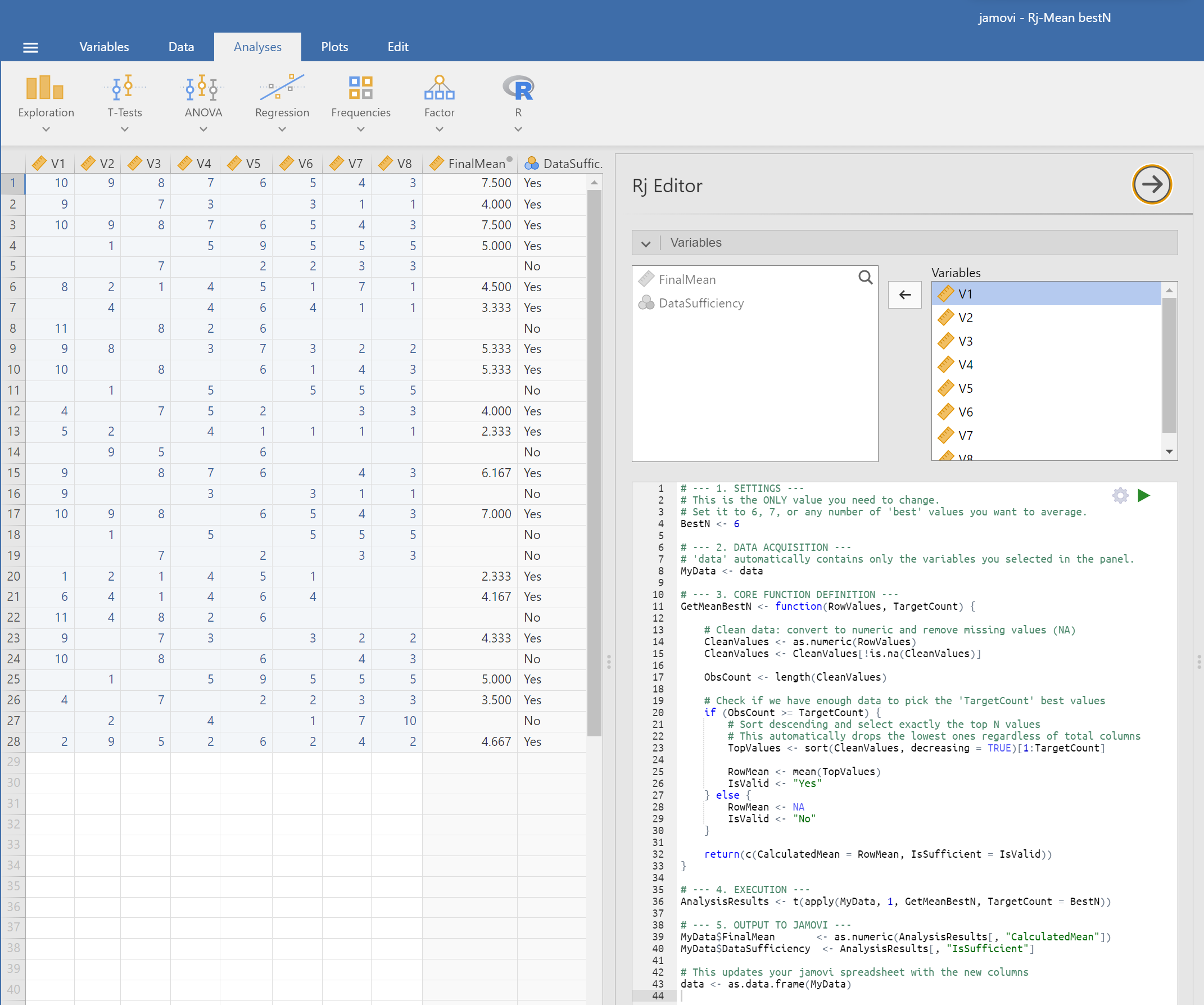
# --- 1. SETTINGS ---
# This is the ONLY value you need to change.
# Set it to 6, 7, or any number of 'best' values you want to average.
BestN <- 6

# --- 2. DATA ACQUISITION ---
# 'data' automatically contains only the variables you selected in the panel.
MyData <- data

# --- 3. CORE FUNCTION DEFINITION ---
GetMeanBestN <- function(RowValues, TargetCount) {

    # Clean data: convert to numeric and remove missing values (NA)
    CleanValues <- as.numeric(RowValues)
    CleanValues <- CleanValues[!is.na(CleanValues)]

    ObsCount <- length(CleanValues)

    # Check if we have enough data to pick the 'TargetCount' best values
    if (ObsCount >= TargetCount) {
        # Sort descending and select exactly the top N values
        # This automatically drops the lowest ones regardless of total columns
        TopValues <- sort(CleanValues, decreasing = TRUE)[1:TargetCount]

        RowMean <- mean(TopValues)
        IsValid <- "Yes"
    } else {
        RowMean <- NA
        IsValid <- "No"
    }

    return(c(CalculatedMean = RowMean, IsSufficient = IsValid))
}

# --- 4. EXECUTION ---
AnalysisResults <- t(apply(MyData, 1, GetMeanBestN, TargetCount = BestN))

# --- 5. OUTPUT TO JAMOVI ---
MyData$FinalMean       <- as.numeric(AnalysisResults[, "CalculatedMean"])
MyData$DataSufficiency  <- AnalysisResults[, "IsSufficient"]

# This updates your jamovi spreadsheet with the new columns
data <- as.data.frame(MyData)
This screenshot could be like your example:
- screenshot.png (374.31 KiB) Viewed 173888 times
Cheers,
Maurizio
https://www.jamovi.org/about.html
Re: Calculating mean based on different number of cells containing values
Posted: Sun Mar 29, 2026 10:21 am
by DorotheaJulia
Thank you for a detailed description!